
Schedule Your Next Adventure
Scheduling polls for D&D and game night groups
EventMoot is a free scheduling app for D&D, TTRPG and board game groups: one link polls dates and decisions, and players answer without an account. The paid plan, Ent, adds recurring sessions, calendar sync and more for $5/mo or $50/yr.
No credit card required.
Stop losing campaigns to scheduling conflicts. EventMoot brings your group together with smart polls that find the perfect time for everyone. One link handles dates, times, game selection, and everything else your party needs.
Group chat + a scheduling poll vs EventMoot
Group chat + a scheduling poll“Who's coming?” scrolls away in the chat.
EventMootOne page keeps count of who's going.
Group chat + a scheduling poll“7pm… whose 7pm?”
EventMootEveryone sees the time on the page in their own time zone.
Group chat + a scheduling pollThe date gets buried under the next hundred messages.
EventMootOne decided page with the date and a calendar file.
How It Works
Set Up Your Session
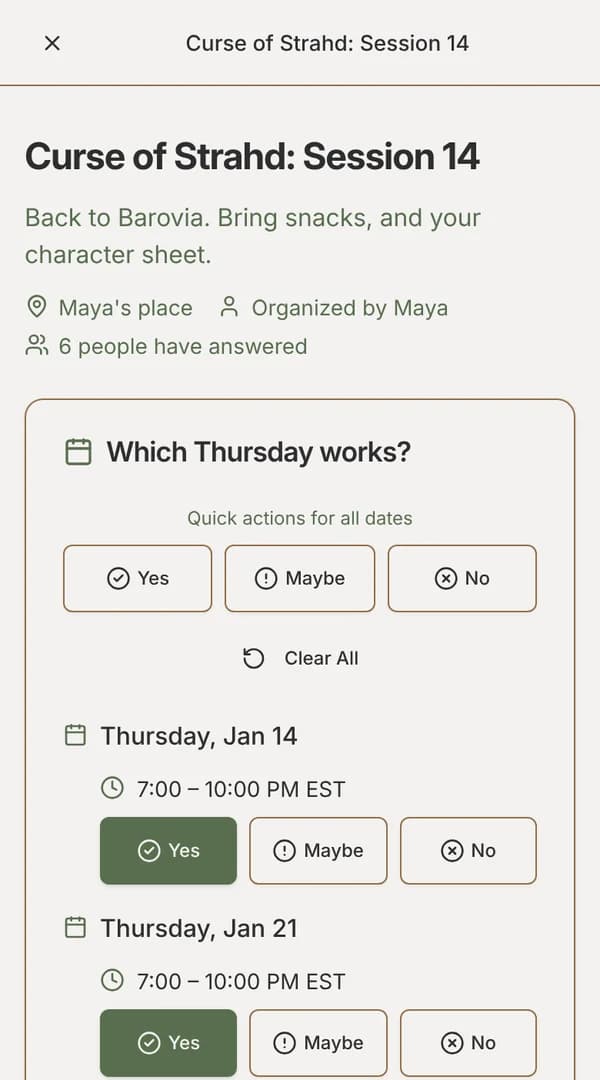
Create an EventMoot poll. Add multiple dates with time slots and questions for other needs, like food, game systems, one-shot vs campaign plays, or more.
Drop the Poll Link in Your Group Chat
Share your EventMoot link in Discord, WhatsApp, or whatever platform your group uses. That's it. Your party doesn't need to sign up to EventMoot to participate.
Watch Availability Roll In
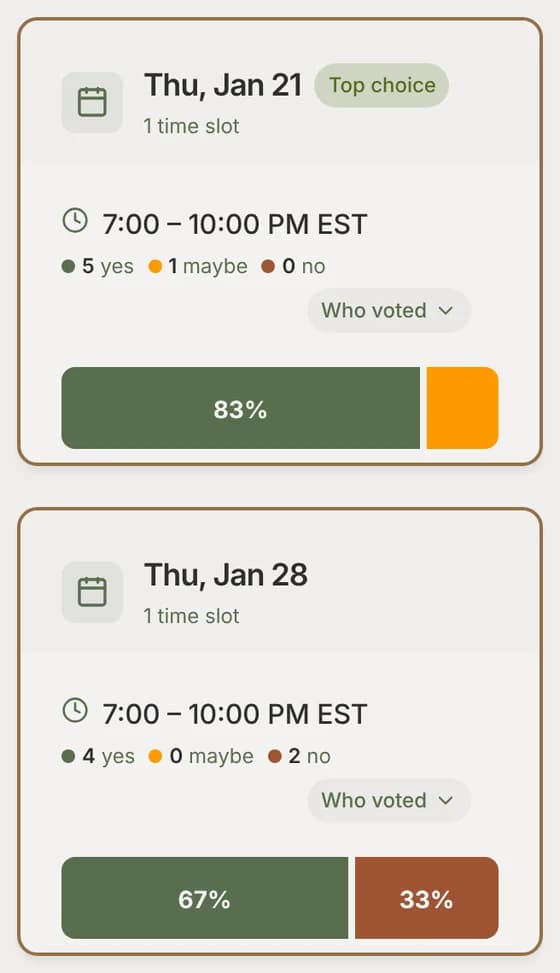
See responses in real-time. EventMoot's simple visuals show the most and least preferred options.
Lock in the Date and Other Decisions
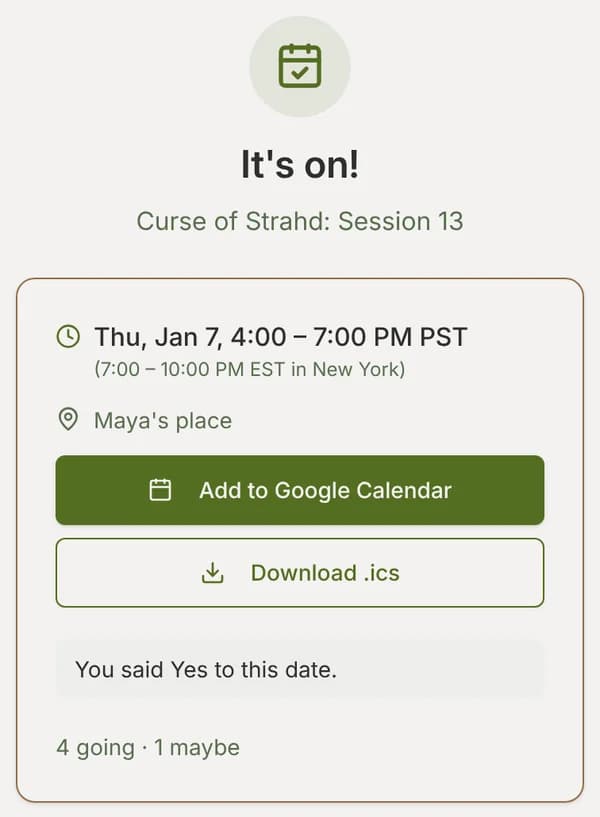
Pick the option that works best for your party. Everyone who follows the link sees the date in their own time zone, ready to add to their calendar.
Everything You Need to Organize Your Games
From one-shots to multi-year campaigns, EventMoot has the tools to keep your group playing regularly.

Easily see what works for the most people. EventMoot's polls let everyone quickly click their available days and times. Smart Response automatically fills in date poll responses based on your saved availability settings, on every plan.
Automatic conflict detection warns when event times overlap with existing commitments, preventing double-booking.
Getting started guide
Meet at the same time every week? EventMoot posts each session for you and your party just says who's going. If your time moves around, it drafts a date poll for each session for you to publish instead, with suggestions based on when people are free. (Ent only)
Recurring sessions guide
Watch as poll votes roll in instantly. EventMoot's real-time updates and visual comparisons help you make quick, informed decisions. No manual refreshing needed.

Beyond just scheduling. Add polls for food orders, game selection, house rules, character creation decisions, and whatever else your party needs to coordinate.
Combine any of the 7 poll types in a single event: dates, yes/no, single and multiple choice, rankings, ratings and text responses. Get everything decided before session zero, so you can jump straight into the adventure.
Flexible invitations: Share via link, email, or direct invite. Guests can respond without creating an account. Only the organizer and moot admins see who answered what; everyone else sees the totals.
Poll types guide
Moots are your persistent adventuring party. Track member availability, share campaign updates on message boards, and create recurring sessions. Smart scheduling analyzes group availability to suggest optimal meeting times.
Works across time zones: Everyone sees times in their own time zone, automatically. Perfect for distributed groups across continents.
Perfect for weekly D&D campaigns, monthly board game groups, or any regular gathering. Entling includes 1 moot with up to 10 members. Upgrade to Ent for unlimited moots (unlimited members per moot) and advanced features!

Store and share rulebooks, character sheets, maps, and campaign materials in your moot's dedicated document library. Organize files in folders, search everything, and track who's accessed what.
Entling: 500 MB, files up to 10 MB. Ent: 10 GB, files up to 200 MB. Upload PDFs, Office docs, images, archives, and more.

Entling (Free Forever): Perfect for casual gatherings. Get 5 events per month, up to 20 attendees per event, up to 5 polls per event, 1 moot with up to 10 members, all 7 poll types, templates, Smart Response auto-fill and 500 MB document storage. No credit card required, ever.
Ent ($5/mo or $50/yr): For dedicated groups. Unlimited events, moots (unlimited members per moot), polls and attendees. Plus 10 GB document storage (files up to 200 MB), email invites and surveys, recurring events and smart scheduling with group availability analysis.
Compare plans • 14-day free trial available
On Ent, connect your Discord server and post event notifications to your channels automatically. When you publish or finalize an event, your Discord community gets instant updates.
Perfect for gaming guilds and communities already coordinating on Discord. Keep everyone informed without leaving your favorite platform.
Discord guide
On Ent, connect Google Calendar, Apple iCloud, Nextcloud or any CalDAV calendar. Its busy times count when you fill in dates, and decided sessions you're going to are added to it automatically.
On every plan, Fill dates already answers No to dates that clash with other EventMoot events you're going to.

Every moot has a dedicated message board for campaign updates, memes, and strategy discussions. Features nested replies, emoji reactions, and file attachments (up to 5 files per post). Real-time updates keep your party engaged even when you're not rolling dice.
Advanced features: Search all posts and replies, tag posts, and pin important announcements to keep them visible.
Share character art, debate build strategies, coordinate between-session downtime, or just post memes. Your moot's message board keeps everyone connected and invested in the campaign.
More guides are in the Help & Docs, including using EventMoot from Claude and other AI assistants.
Ready to Simplify Your Game Scheduling?
Make it easier to find times that work for your group. Spend less time planning and more time playing.
Entling is free forever • No credit card required to start • Upgrade to Ent with 14-day free trial